Private meeting notes for Mac. No bot. Nothing leaves your laptop.
Dayglass records both sides of a Zoom, Meet, or Teams call from your AirPods or speakers, then writes the decisions and action items on your Mac. While the meeting is still going, Claude, Cursor, and the other agents on that Mac read the live transcript. Free for up to 5 meetings/week.
brew install --cask igorganapolsky/dayglass/dayglass
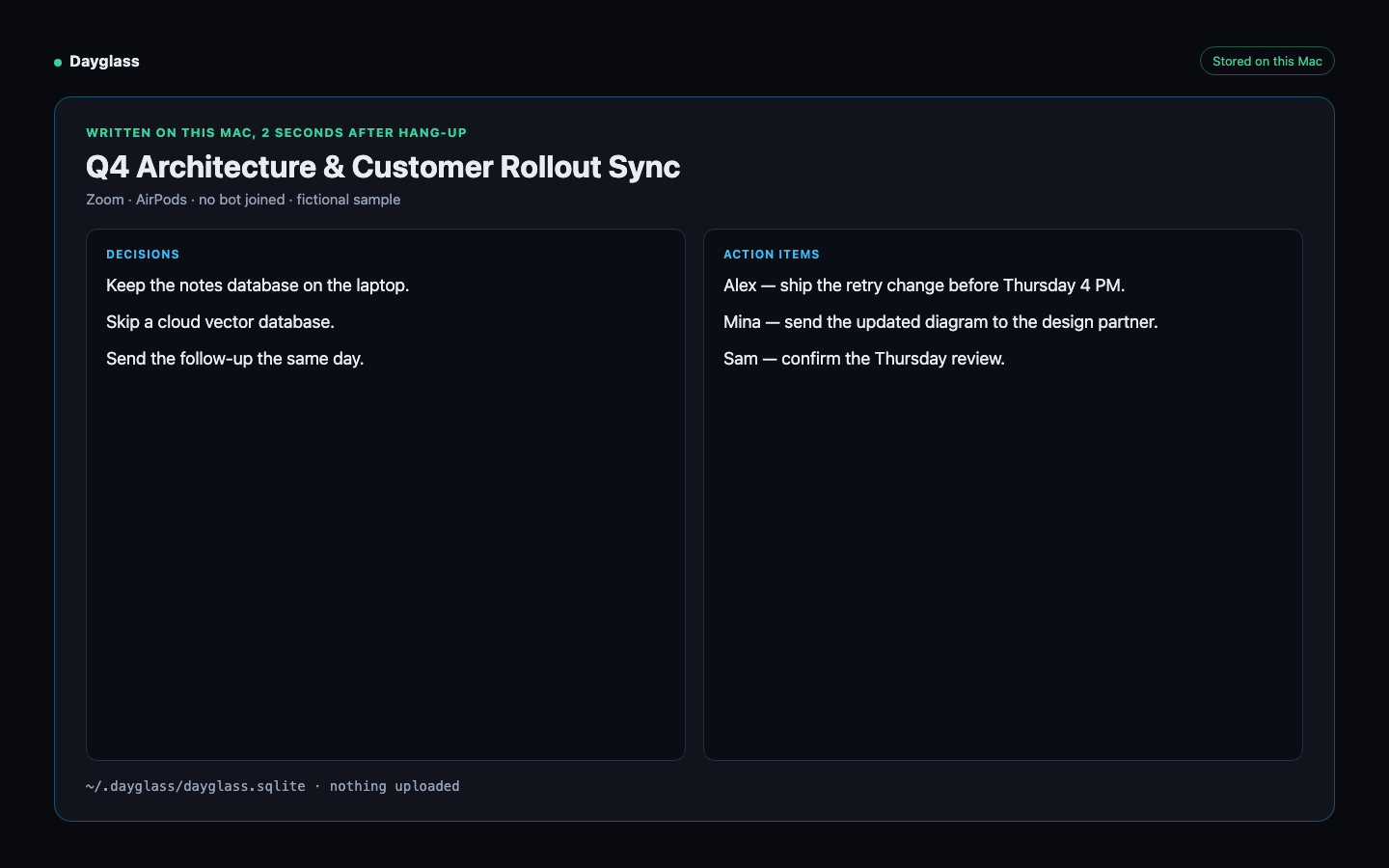
Q4 Architecture & Customer Rollout Sync (Zoom • AirPods • No Bot Joined)
- ✓ Keep the notes database on the laptop.
- ✓ Skip a cloud vector database.
- ✓ Send the follow-up the same day.
- ☐ Alex: Ship the retry change before Thursday 4 PM.
- ☐ Mina: Send the updated diagram to the design partner.
- ☐ Sam: Confirm the Thursday review.
Your meetings and screen history, searchable in milliseconds
🎧 Bot-free headphone & mic recording
Captures both sides of Zoom, Google Meet, and Teams calls directly from macOS system audio (including AirPods) and your microphone—without a recording bot joining the call.
📋 Automatic meeting notes & follow-ups
As soon as a call ends, Dayglass extracts key decisions, action items by owner, and a ready-to-send follow-up email draft using your local model.
🔍 Search every slide, terminal error & call
Find any shared slide, terminal stack trace, doc, or spoken quote across months of calls and screen history—using less idle RAM (~93 MB) than a single browser tab.
✨ Live call assistant & catch-me-up
Joined late or zoned out? Click "Catch Me Up" to see what was just proposed, how it connects to prior meetings, and the sharpest questions to ask next.
🔌 Live meeting for Claude and your other agents
When a meeting is in progress, Claude Desktop, Claude Code, Cursor, and the other agents on your Mac read who is talking and what was just said. They use the local tool dayglass_get_live_meeting. The transcript stays on the Mac.
⭐ Turn 15-minute focus into reusable playbooks
Press ⌘⌃B while debugging or shipping a workflow. Dayglass summarizes the exact steps you took into a clean checklist or reusable agent skill.
How Dayglass runs privately on Apple Silicon
Every frame, audio chunk, and meeting summary stays inside ~/.dayglass/dayglass.sqlite on your Mac. The background capture daemon idles at ~93 MB RAM (local Whisper & LLM inference run on-demand only when transcribing or summarizing).
Don't take our privacy claims on faith—verify them on your Mac
👤 Built by Igor Ganapolsky • Inspectable Local SQLite
Built by AI systems engineer Igor Ganapolsky after getting tired of cloud meeting bots joining sensitive engineering and customer calls. Every table lives in plain SQLite at ~/.dayglass/dayglass.sqlite—inspect it with sqlite3 or verify zero outbound uploads via Little Snitch / lsof -i.
💬 Built-In 1-Click Call Consent Snippet
Recording without a bot still requires etiquette and consent. Click Copy Call Consent Note inside Dayglass (or above) to drop a friendly one-liner into Zoom/Meet chat: "I'm taking local notes on my Mac with Dayglass (no cloud bot)—happy to share the summary after!"
🛡️ Automatic Password, Banking & PII Guardrails
Dayglass automatically pauses capture when 1Password, Bitwarden, Keychain Access, banking/payroll tabs, or private browser windows are focused, and scrubs emails/keys before any MCP prompt is shared.
Try bot-free meeting notes free. Upgrade for unlimited history & MCP.
- Bot-free call recording & summaries (up to 5 meetings/week)
- On-device Apple Vision screen OCR & SQLite FTS5 search
- 7-day rolling local screen & audio history
- 1-click call consent chat snippet & private-window auto-skip
- 100% local storage in
~/.dayglass
Free install on macOS 13+. Stops at 5 meetings a week.
- Local meeting notes and screen search on your Mac
- Unlimited bot-free call recordings, summaries, action items & follow-up drafts
- Unlimited local history across months of meetings, slides, and terminal windows
- Built-in MCP Server & CLI so Claude, Cursor, and the other agents on your Mac can read a meeting while it is still in progress
- Starred Focus Sessions (⌘⌃B) & reversible local PII redaction
Unlimited meetings and local history on your Mac. Cancel anytime.
- Managed cloud AI for Dayglass
- The Mac app and on-device meeting notes
- Cancel anytime
$249 a month. The $19 plan is the Mac app and on-device memory.
- $9.99 AI Agent Cost & Memory Playbook
Gumroad checkout. This file does not activate the Mac app.
How Dayglass compares to Granola, MacWhisper, Fathom & Screenpipe
| Capability | Dayglass | Granola | MacWhisper | Fathom / Otter | Screenpipe |
|---|---|---|---|---|---|
| Bot-Free Call Capture (AirPods + Mic) | Yes (native ScreenCaptureKit) | Yes (bot-free) | Yes (manual/system audio) | No — joins call as visible bot | Yes (24/7 local capture) |
| Where Transcripts & Notes Live | 100% on your Mac (`~/.dayglass`) | Cloud LLM processing | Local on Mac | Vendor cloud servers | Local disk |
| Search Slides & Screen OCR History | Yes (Apple Vision OCR + SQLite FTS5) | No (audio/notes only) | No (audio files only) | No (meeting video only) | Yes (OCR + audio search) |
| Built-In Claude Code & Cursor MCP | Yes. Live transcript while the call is in progress | No local MCP server | No | No local MCP server | Yes (via CLI/plugins) |
| Free Tier Includes Bot-Free Recording | Yes (up to 5 meetings a week) | Limited trial | Free basic Whisper model | Free with visible call bot | Open-source CLI / paid desktop |
Everything you need to know before installing
How does Dayglass record AirPods calls without a bot?
Dayglass uses native macOS ScreenCaptureKit to record both your microphone and headphone/system audio directly on Apple Silicon. The background capture daemon uses ~93 MB idle RAM (local Whisper and LLM inference run only when transcribing or summarizing). No cloud bot ever joins your Zoom, Teams, or Meet call.
Does any screen or audio data leave my Mac?
Never. All Apple Vision OCR frames, audio transcripts, and meeting notes live in ~/.dayglass/dayglass.sqlite on your local disk. Password managers, banking tabs, and private windows are automatically skipped.
Can Claude and other agents see a meeting while it is still in progress?
Yes. Dayglass keeps the call on your Mac. Claude, Cursor, and the other agents you run there call dayglass_get_live_meeting and get the speaker-tagged transcript, the people on the call, and the shared screen while the meeting continues.
Why choose Dayglass over Granola or MacWhisper?
Granola is great for bot-free meeting notes, and MacWhisper is great for transcribing audio files. Dayglass combines 100% local bot-free meeting notes with searchable screen OCR (slides, docs, terminal errors) and a built-in MCP server so Claude, Cursor, and the other agents on your Mac can read the meeting while it is still in progress.